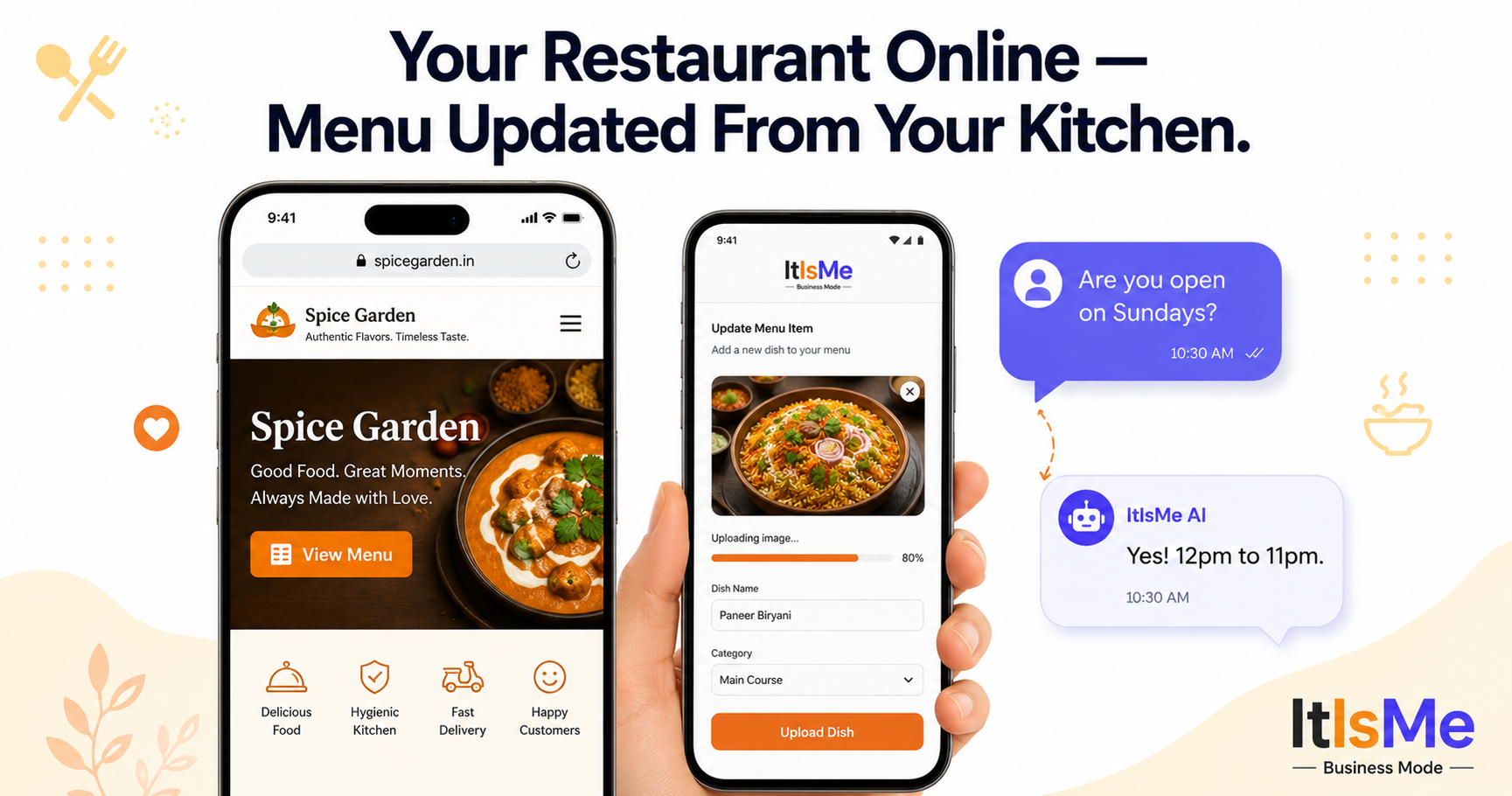
Get a free website for your restaurant with ItIsMe. Show your menu, hours and location. AI chat answers customer queries 24/7. Business mode, Android app. No coding. Free forever.
Every restaurant that appears on Zomato or Swiggy is competing for the same customer alongside every other restaurant in the area. On your own website, you are the only option on the page. Customers who find you directly — through Google, through your Instagram link, through a WhatsApp recommendation — see your brand, your menu and your story without a competitor in sight.
ItIsMe gives your restaurant a complete free website in Business Mode — with your menu, your opening hours, your location, an AI chat that answers customer queries 24/7, and an Android app that lets you update your menu from your kitchen in seconds.
Get Started Free — No Credit Card Needed
Zomato, Swiggy and Google Maps are useful for discovery. But they are not your website — they are platforms where you rent visibility and compete with dozens of alternatives at once. Your own restaurant website gives you something none of those platforms can:
ItIsMe offers two website modes. For restaurants and food businesses, Business Mode is the right choice.
Business Mode gives your website a fully customisable hero section with your restaurant name, tagline, feature highlights and CTA buttons — for example, "Spice Garden · Authentic North Indian Cuisine · View Menu." Your logo sits prominently in the header. Visitors immediately know they are on a brand page, not a generic profile.
In Business Mode you can showcase your restaurant's story, your menu and products, your team, your location and your special offers — in a layout designed specifically for a business, not an individual. The AI chat works in Business Mode to answer every customer query automatically, and the Android app lets you manage the entire website from your phone.
Restaurant menus change constantly. A seasonal special, a sold-out item, a new dish, a price change — every update used to mean calling a developer or logging into a complicated CMS on a laptop.
With the ItIsMe Android app, updating your restaurant website takes 30 seconds from anywhere:
Nobody else in the free website space gives restaurants a dedicated Android app to manage their website from anywhere in the kitchen, dining room or on the go.
Restaurant Name and Brand Hero (Business Mode): Your restaurant name, tagline, a hero image and a clear CTA — "View Menu", "Make a Reservation" or "Order Now". First impressions in under 3 seconds.
Menu / Products Section: Add your dishes with names, descriptions and prices. Use the Android app to photograph and upload new dishes directly from your phone. Customers browse your menu before they visit or before they call — reducing the most common enquiry your staff field every day.
About Section: Your restaurant story — when it started, the cuisine style, the inspiration, what makes your food different. Customers who connect with your story are more loyal and more likely to recommend you.
Gallery: Photos of your food, your dining space and your team. Real photos taken on your phone — uploaded directly through the Android app — build appetite and trust before a customer visits. Update the gallery as often as you like.
AI Chat Assistant: Train it with your most common customer questions — opening hours, reservation policy, delivery availability, parking, dietary options, special offers. Every customer who asks those questions on your website gets an instant, accurate answer — 24 hours a day — without your staff having to reply manually.
Contact and Location: Your address, phone number, email and Google Maps integration so customers can find you easily. Add your WhatsApp number for customers who prefer messaging to calling.
| Feature | ItIsMe Restaurant Website | Zomato / Swiggy Listing |
|---|---|---|
| Your own website URL | ✅ itisme.in/yourname | ❌ Platform URL |
| Competitors shown alongside you | ❌ Never | ✅ Always |
| AI chat answers customer queries 24/7 | ✅ Free, trained on your info | ❌ No |
| Android app — update menu from phone | ✅ Full management | ⚠️ Limited |
| Google indexed as your own brand | ✅ Yes | ❌ Platform ranks, not you |
| Commission on orders | ❌ None | ✅ 15–30% per order |
| Brand hero with your logo | ✅ Business Mode — full custom hero | ❌ Platform template |
| Cost | Free forever (Basic) | Free listing + commission or paid promotions |
Step 1 — Sign up: Go to itisme.in and register. Free, no credit card. After a brief review, you receive your login credentials — usually within 24 hours.
Step 2 — Select Business Mode and claim your URL: Choose Business Mode when setting up your profile. Your restaurant gets a URL at itisme.in/yourname — for example, itisme.in/spicegarden or itisme.in/blueribboncafe.
Step 3 — Set up your hero and add your menu: Fill in your restaurant name, tagline and logo. Add your menu items with photos and prices in the Products section. Takes about 20 minutes for a complete setup.
Step 4 — Train your AI chat: Add 5 to 10 Q&A pairs covering the questions customers ask most. The AI goes live on your website immediately after you save and answers customers automatically from that point on.
Step 5 — Download the Android app: Install the ItIsMe Android app and manage your restaurant website from your phone from this moment — update your menu, upload food photos, change hours and manage your AI chat from anywhere.
Yes. The Basic plan is permanently free — no credit card, no time limit. You get a complete restaurant website with menu, hours, location, contact form and AI chat at no cost. The Professional plan at ₹999/year gives you more product listings if your menu is large.
Yes. Download the ItIsMe Android app and update your menu, add new dishes, change prices or upload photos of new items directly from your phone. Open the app, make the change, and it appears on your restaurant website instantly.
Business Mode. It gives your restaurant a fully customisable hero section with your restaurant name, tagline, CTA button and logo — designed for brands and businesses rather than individual profiles.
Train it with your opening hours, reservation policy, delivery availability, dietary options and special offers. The AI answers every customer who asks these questions automatically, 24 hours a day — no staff time required.
On Zomato and Swiggy, your competitors appear alongside you and the platform controls your visibility based on ratings and paid promotions. On your own ItIsMe website, you are the only restaurant — no competitors, no commission, no algorithm. Customers who find you directly see only your brand and your menu.
ItIsMe's Products section lets customers browse your menu items online. For full online ordering with payment processing, a custom restaurant website would be better suited. V2S Infosystem also builds custom restaurant platforms with full ordering capability for businesses that need it.
Stop competing on someone else's platform. ItIsMe gives your restaurant a professional, branded website — free, live in 5 minutes, managed from your phone — with an AI that answers customer queries while you focus on your food.
Create your free restaurant website on ItIsMe →
Also explore: Free Business Website for Small Businesses | Free Website With AI Chat — How It Works | How to Make a Free Website — Step by Step